
Tambien hay una version en castellano de este post, click aca.
Welcome to this post, on this post we saw how to find the data type of our variable but sometimes we need to change the type of variable to make an operation on it. For example, convert a variable from string to number to perform an arimethical operation. Let’s take a look for the available functions:
| Function | Description |
| CBool | Convert a zero in false and another value in true |
| CByte | Convert an expression to byte |
| CCur | Convert an expression to currency |
| CDate | Convert an expression to date |
| CDbl | Convert an expression to double |
| CInt | Convert an expression to integer |
| CLng | Convert an expression to long |
| CSng | Convert an expression to single |
| CStr | Convert an expression to string |
All these functions take as argument a validate numeric expression or an string that can be converted as a number and reverse. Let’s watch some validate numeric expression:
- 1
- 254.5
- 555
- 2/5 + 76 (even this)
And a validate string expression can be «123.45» but can not be «50/3». Let’s make an example to test some functions, for this we’ll make a file with the name of convert.vbs and we’ll put this code:
dim value_1
dim value_2
dim total

value_1 = 11
value_2 = 22

total = value_1 + value_2
msgbox total & " " & typename(total),,"Convert sample"
total = cstr(value_1) + cstr(value_2)
msgbox total & " " & typename(total),,"Convert sample"
value_1 = cdate(#22/10/2024#)
msgbox value_1 & " " & typename(value_1),,"Convert sample"
value_2 = cdate("7:33:00 pm")
msgbox value_2 & " " & typename(value_2),,"Convert sample"First, we declare three variables and we assign a value to the first variables. Then, we assign the sum of the values to total and we show it with the data type through msgbox, the output of this statement is:
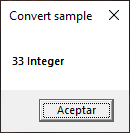
We make another sum but we change the type of data with cstr to convert from integer to string and we repeat the operation with msgbox, the output is:
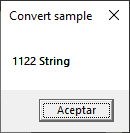
In this case, it makes a concatenation because they’re string and not numbers. The next step is assign a new value to value_1 and we convert it to date with cdate. Watch the format of the value. We repeat the same statement with msgbox but in place of total we use value_1. The output of the statement is:
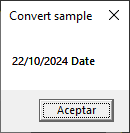
The format will depend of the locale of your computer, this is in my case. The last example apply another cdate but this time with an hour and we store it on value_2. We repeat the statement of msgbox to show this new value. Let’s take a look to its output:
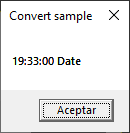
In summary, we saw how to convert between types, which are, how to use them, and example with some of these. I hope you’ve found it useful. You can follow me on this social networks:


Donatión
It’s for site maintenance, thanks!
$1.50

 El blog de Tinchicus