
Tambien hay una version en castellano de este post, click aca.
Welcome to this post, we talk about variables on this post but today we’ll talk about a variant of this.
A particular behaviour of this type of variable it’s than can not change its value once it’s established. This is inherited from Visual Basic and give us various advantages in our codes. For example, we can have the following statement:
object.enabled = TRUEThat’s more understandable than this:
object.enabled = -1They’re the same but one is more direct than the other at moment of viewing. The value of a constant can be used in all our code and its property warranties us that can not be affected by the code. Let’s take a look of its syntax:
const id_name = valueAlways starts with the const word followed by the identifier name and an assigned value. Remember, you can not change the value once the const is declared. To understand how it works let’s take a look to the following code:
const value_1 = 25
const value_2 = 50
const value_3 = 75

msgbox value_1,,"constant sample"
msgbox value_2,,"constant sample"
value_3 = value_1
msgbox value_3,,"constant final"First, we declare three constants. Then, we’ll show with msgbox. Let’s watch the first msgbox

In this case, we watch the value of the first constant. Let’s watch the second msgbox
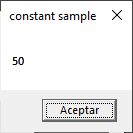
Now, we’ve the value of the second constant. The next step is assign a new value to the third constant and show it with a msgbox. Let’s watch the third msgbox
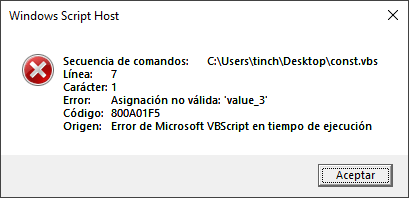
We’ve an error message because of we try to change the value of constant. This interrupts our code and finish immediately. For example, you can establish a constant called pi with the value 3.141592 for use it with mathematical equations or how to mentiont us at the beginning to identify in a better way to a value.
In summary, we talk about constants, what they’re, how to use, and an example to watch it in action. I hope you’ve found it useful. You can follow me on this social networks:


Donatión
It’s for site maintenance, thanks!
$1.50

 El blog de Tinchicus