
Tambien hay una version en castellano de este post, click aca.
Welcome to this post, today we’ll talk about others operators.
On the above post, we talked about some different basic operators but on this we’ll talk about some specific mathematical operations. Let’s begin with the first two functions.
Log and Exp
These are the available logarithmic functions. They’re relationed with e number and its value is aproximadately 2.718282. The function log calculates the natural logarithm of a number and exp elevates the number e to the value received as argument. Let’s watch a simple example:
number = 10

text = "Log: " & log(number) &vbcrlf
text = text & "exp: " & exp(number)

msgbox text,,"Log & Exp Output"First, we define a variable with a value. Then, we define a new variable where we store the result of log with above variable and we indicate with a text that is the log operation. The next is concatenate another text indicating the exp operation and concatenate the result of exp in number. Finally, we show the final text in text. Let’s watch how is its output:
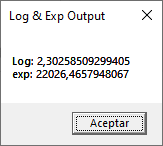
We’ve the result on each operation. These functions we can use it with the operators on above post to make mathematical formulas.
sqr
This function returns the square root of a value, let’s watch the following example:
number = 10

text = "Sqr: " & sqr(number)

msgbox text,,"Log & Exp Output"It’s similar to the above example, where we first declare a variable with a number. Then, we define a new variable where we store the result of the function and the above variable and indicating this operation. Let’s watch its output:
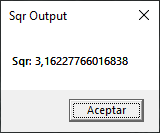
sign
This function returns which sign has a number. If the number is positive returns 1, in the case of being negative returns -1 and if we pass 0 returns 0. Let’s watch a example:
number = 10

text = "Sgn: " & sgn(number)

msgbox text,,"Sgn Output"With a variable defined, the next is apply the above variable to the function and the result we assign to another variable and finally show this value. Let’s watch its output:
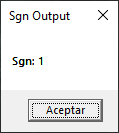
In this case returns 1 because it has a positive number. This can be useful with a conditional and use it with different operations based on sign of the number.
abs
This returns the absolute value of a number. It means that if you pass a value as 2.5511, it returns the same value but if you pass a value as -2.5511, it returns 2.5511. The same number but without sign. Its syntax is:
abs(value)With this commented, let’s pass to the next function.
int
This function always returns the integer part of a number if the number is positive but if the number is negative it returns next integer of the number. Let’s watch the following example:
number = 10

text = "Sqr +: " & int(sqr(number)) & vbcrlf
text = text & "Sqr -: " & int(-sqr(number))

msgbox text,,"Int Output"We take the example of sqr and we apply int to its result and we concatenate the same operation to the variable text but with the negative sign to the second square root. Finally, we show the final value on text. Let’s watch its output:
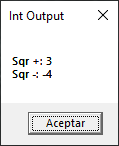
How we mentionate before, it returns its integer part for the positive number and it returns the next integer for negative number. Be careful, when used it to take the integer part of a number. Let’s pass to the next function.
fix
It is exactly the same function as int but it works in the opposite way. It always returns the integer part of a number without care about its sign. Let’s take the above example and modify in the following way:
number = 10

text = "Sqr +: " & fix(sqr(number)) & vbcrlf
text = text & "Sqr -: " & fix(-sqr(number))

msgbox text,,"Fix Output"It’s the same example but we change the int for fix. Let’s watch its output:It’s the same example but we change the int for fix. Let’s watch its output:
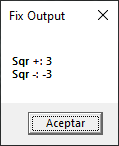
Now it returns the same value in both cases. You can choose between these two functions depending on the output that needs manage for your code. Let’s pass to the last function.
round
This function allows us to round the decimals of a number. In this case, we can specify the digits for the decimals. If we don’t pass a value or zero, it rounds to the nearest integer. Let’s watch the following example:
number = 10

text = "Sqr 1: " & round(sqr(number)) & vbcrlf
text = text & "Sqr 2: " & round(sqr(number),3) & vbcrlf
text = text & "Sqr 3: " & round(sqr(number),5)

msgbox text,,"Round Output"Again we use the example of sqr but this time we repeat the operation with sqr three times. To each operation we apply the round function and in each case we use a different amount of digits. In the first case, we don’t pass any number, for the second case we pass three digits and five digits in the third case. All these values we store in the variable text and finally we show these values. Let’s watch its output:
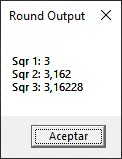
In this case, the first value is rounded to 3 because its nearest integer. The other cases corresponds to the digits that we specify but what will happen if we use the number 3.65433444555661284? Let’s watch its output:
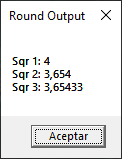
In the first case, we watch that its output is 4 and not 3 because as we said it rounds to its nearest integer. The other values are rounded to the digits specified.In the first case, we watch that its output is 4 and not 3 because as we said it rounds to its nearest integer. The other values are rounded to the digits specified.
In summary, we talk about different mathematical functions, they go from logarithmic functions to rounding functions, we talk about its operations, and an example in each function. I hope you’ve found it useful. You can follow me on this social networks:


Donatión
It’s for site maintenance, thanks!
$1.50

 El blog de Tinchicus