
Tambien hay una version en castellano de este post, click aca.
Welcome to this post, today we’ll talk about the most universal loop in any language.
This function allows us to repeat a block of statements all times we need. First, let’s watch how its syntax is:
for var=start to finish [step value]
	... statements ---
nextAlways starts with a variable that it has a start value and final value joined by the word to. This makes the loop repeats the statements in the block all the times that defines this range. Optionally, we’ve step and this is used to indicate the value to increment the variable that controls the loop. But if we don’t use it, the default value is 1. To understand this let’s analyze the following example:
dim text

for a = 1 to 5
	text = text & "Pos. " & a & vbcrlf
next

msgbox text,,"For Example"In this code, first we declare a variable that we’ll use to store different messages. Then, we use a for to count from 1 to 5. In the block, we add the word pos followed by the number of loop turn and previously we add the before text. Once finished loop we show the final text. Let’s watch its output:
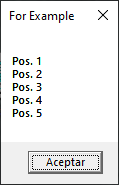
We can watch how it counts from 1 to 5 and stores each message generated in the loop. This is for the case to increment a value but what happens if we need a decrement? Let’s take the above code and change it on the following way:
dim text

for a = 5 to 1 step -1
	text = text & "Pos. " & a & vbcrlf
next

msgbox text,,"For Example"We only change the for. The first change is the order of numbers to count and then we use step. Remember, if we don’t indicate a step value always we use 1 or +1. How we indicate a step -1, for statement uses the operation of -1 to reduce from 5 to 1 and realize the decrement. Let’s watch how its new output:
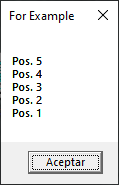
Now, we’ve the two cases to manipulate the form of count in the loop. Let’s watch an example that we’ll use in real life:
dim text
dim arr(3)

arr(1)="Hello"
arr(2)=", "
arr(3)="World!"

for a = 1 to 3
	text = text & arr(a)
next

msgbox text,,"For Example"We follow using the variable for text but we add a new array to store three values. We’ll talk about arrays in another post. Following with this code, we add a value to each position in the array. In the loop we use the counter to recover the value in each position from array. We add each value to the variable for text. Finally, we show the final text. Let’s watch its output:
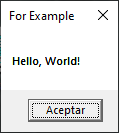
This is the most often use of for statement. On this post, we watch how to use to create a counter to increment or decrement a value. Or to recover the values in an array. Also for make repeatitive statements, in any case is limited by your imagination.
In summary, we talked about for, how it is, how it works, a few examples to watch how it must be used. I hope you’ve found it useful. You can follow me on this social networks:


Donatión
It’s for site maintenance, thanks!
$1.50

 El blog de Tinchicus