
Tambien hay una version en castellano de este post, click aca.
Welcome to this post, today we’ll talk about these particulars variables.
They’ve the capacity to store more than a value. These are stored in different positions and we use them to recover the value. Before talk about this, let’s watch how it is its syntax:
dim arrayName(value)It’s declared in a similar way to a variable but we add a value between parenthesis that represents the last position to store in the array. To store a value, we use the name with the parenthesis and the position to use:
array(0) = valueIt’s so simple as the above example. To recover that value, we use it on this way:
variable = array(0)In this case, we assign the value on that position to a variable and we can use it in our code. Let’s take a look to the following example:
dim arr(5)
dim msg

arr(0) = "Martin Miranda"
arr(1) = "Marta Gargaglione"
arr(2) = "Enzo Tortore"
arr(3) = "Javier Marcuzzi"
arr(4) = "Ariel Polizzi"
arr(5) = "Raul Picos"

for a = 0 to 5
	msg = msg & arr(a) & vbcrlf
next

msgbox msg,,"Array Sample"First, we declare the array and a variable. Then, we assign a value to each position in the array. Watch how we assign to each position a value. To recover the value we use a for that will pass in each position and store it in the variable. We use vbcrlf to separate each value. Finally, we show the result stored in the variable. Let’s watch how is its output:
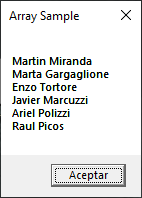
These are the most simple arrays and are called one-dimensional. Where we’ve one value for each position. Let’s take the above example and modifies it on this way:
dim arr(5,1)
dim msg

arr(0,0) = "Martin"
arr(0,1) = "Miranda"
arr(1,0) = "Marta"
arr(1,1) = "Gargaglione"
arr(2,0) = "Enzo"
arr(2,1) = "Tortore"
arr(3,0) = "Javier"
arr(3,1) = "Marcuzzi"
arr(4,0) = "Ariel"
arr(4,1) = "Polizzi"
arr(5,0) = "Raul"
arr(5,1) = "Picos"

for a = 0 to 5
	for b = 0 to 1
		msg = msg & arr(a,b) & " "
	next
	msg = msg & vbcrlf
next

msgbox msg,,"Array Sample"On this case, we made a little and curious change. We add a new limit to the array. This allows us store a new data in the same position but using this new position. Watch how we pass the information. First, we pass two values separated by a comma. Each position is limited by the values in declaration. This is called as two-dimensional arrays. This can be compared with a table:
| dim1/dim2 | 0 | 1 |
| 0 | Martin | Miranda |
| 1 | Marta | Gargaglione |
| 2 | Enzo | Tortore |
| 3 | Javier | Marcuzzi |
| 4 | Ariel | Polizzi |
| 5 | Raul | Picos |
The other modification is in the loop. We keep the precedent loop but we add another to pass through the new «dimension». The next modification is the way that we use to recover information. Now, we pass the value from each pass in the differents loops. Once it’s finished the second loop we add vbcrlf to separate the different lines, just as we do before, and finally we show the final result in msg. You must have the same output that before. Let’s modify the code in the following way:
dim arr(5,1,1)
dim msg

arr(0,0,0) = "Martin"
arr(0,1,0) = "Miranda"
arr(0,1,1) = 47
arr(1,0,0) = "Marta"
arr(1,1,0) = "Gargaglione"
arr(1,1,1) = 50
arr(2,0,0) = "Enzo"
arr(2,1,0) = "Tortore"
arr(2,1,1) = 33
arr(3,0,0) = "Javier"
arr(3,1,0) = "Marcuzzi"
arr(3,1,1) = 48
arr(4,0,0) = "Ariel"
arr(4,1,0) = "Polizzi"
arr(4,1,1) = 49
arr(5,0,0) = "Raul"
arr(5,1,0) = "Picos"
arr(5,1,1) = 50

for a = 0 to 5
	msg = msg & "Name: "
	for b = 0 to 1
		msg = msg & arr(a,b,0) & " "
	next
	msg = msg & "Age: " & arr(a,1,1) & vbcrlf
next

msgbox msg,,"Array Sample"Again, we add a dimension to the array. In this case, we change it to a three-dimensional array. This changes the way that we store the data. But now, we’ve a new information for the person. Another change is in the loops. First, we add a string to identify the name. In the second loop, we add the third dimension. After of this, we add the new value and its identification. Again, at the end we show the final result. Let’s watch its output:
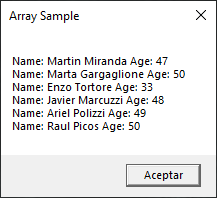
In fact, we can use all dimensions we need. And we can say that they’re of n-dimensions. But in real life, I didn’t see beyond two-dimensional arrays.
In summary, we talked about array, what it is, how it works, and a few examples to apply it. I hope you’ve found it useful. You can follow me on this social networks:


Donatión
It’s for site maintenance, thanks!
$1.50

 El blog de Tinchicus