
Tambien hay una version en castellano de este post, click aca.
Welcome to this post, today we’ll talk about text strings.
This language manages strings of native way and doesn’t need an external library or another type (as char). Simply we assign the text to the variable, remember that VBScript uses variant as a general type. Let’s watch how to assign a text:
msg = "Testing text"
msg = 'Testing text'In other languages, the single quote is used for a single character and double quotes for text but here both are used to store text. The literals are part of string but they can’t be modified like the value in a variable, let’s watch another example:
Literal: msgbox "Testing text",,"Msgbox title"
Variable: msgbox message,,titleIn the first case, the message and title will be these and we can’t change them. In the second case, msgbox shows the texts stored on the variables used for message and title.
Let’s talk about some functions. The first one is chr, this returns the ASCII character, let’s watch its syntax:
chr(ascii value)The value is from 0 to 255, let’s make a simple example to understand how it works:
randomize timer

dim pass

for i = 1 to 8
	car = int(rnd * 25) + 97
	pass = pass & chr(car)
next

msgbox pass,,"Password Generator"This code can generate a password mixing random characters.To make this we use a for to count eight numbers, in the block we generate a random number between 97 to 122. This range are the letters a to z, the returned character is concatenated to preceding text in pass. Once the loop is finished, we show the text in pass with a msgbox. Let’s watch how it’s its output:
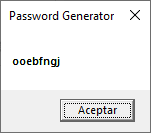
Each time we execute this script, it will return a different password. Another function that we’ve is asc, this returns the ASCII number from a character. Let’s watch how it’s its syntax:
asc(character)We pass the character as argument and will return a value. Let’s watch a simple example:
dim text
dim car
dim num

for i = asc("A") to asc("E")
	text = text & chr(i) & " = " & asc(chr(i)) & vbCrLf
next

msgbox text,,"Asc sample"In the for we use the funcion asc to change the characters to its ASCII number and we use it to count in the loop. In the block concatenate value returned by chr with the value of i, a text and the value of asc with the same preceding expression. The last expression is a constant used to emulate an Enter. Once it’s finished we show the final result stored in text. Let’s watch how it’s its output:

We can watch the character and its ASCII value. In the example, we use a constant that represents an Enter but there are other ones, let’s watch some of this:
| ASCII Code | Constant | Description |
| 0 | VbNullChar o VbNullString | Null character |
| 8 | Unavailable | Backspace |
| 9 | vbTab | Tab |
| 10 | vbLf | Next line |
| 11 | vbVerticalTab | Vertical tab |
| 12 | vbFormFeed | Next page |
| 13 | vbCr | Carriage return |
| 13+10 | vbCrLf | New line |
On the left column, we’ve the ASCII value for each constant.. On the middle column, they’re constants that we can use in our codes and the right column is a description for the constant and ASCII value. If you want know more ASCII values I recommend you the next URL:
We’ve two more functions to work on our strings. These are made to change to upper or letter cases. lcase changes to lower cases and ucase changes to upper case. Let’s watch the syntax of both:
lcase(text)
ucase(text)As argument can use from a character to a text. Let’s watch an simple example to understand it:
dim txt
dim ans

txt = "Welcome to tinchicus.com"
ans = lcase(txt) & vbCrLf
ans = ans & ucase(txt)

msgbox ans,,"Case sensitive"We define a variable with a text, then we take the another variable and use the lcase function to change the preceding variable. We concatenate the constant for new line to emulate an enter. Again, we concatenate the result of ucase to preceding result. Finally, we show the final result stored in ans. Let’s watch it’s its output:

These functions are used to standardize the letters and make them all in the same case. This can be very useful when we need compare different strings.
In summary, we talked about strings, how to define, an example, and several functions to work with them. I hope you’ve found it useful. You can follow me on this social networks:


Donation
It’s for maintenance of the site, thanks!
$1.50


 El blog de Tinchicus