
Tambien hay una version en castellano de este post, click aca.
Welcome to this post, today we’ll talk how to manage date and time.
Time / Date
These two functions allow us to assign the actual hour and date to a variable. Let’s watch the following example:
dim final, timenow, datenow

timenow = time
datenow = date
final = timenow & vbCrLf
final = final & datenow & vbCrLf
final = final & timenow & "-" & datenow

msgbox final,,"Time/Date"We declare three variables to be used in our code. We use to timenow to receive the value returned by time and then we make the same for datenow but with date. We use final to store and concatenate the results of both functions and a last value concatening both values. Finally, we show the result in final. Let’s execute to watch the output of this code:
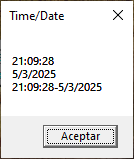
In the picture, we can watch how the functions give us the actual time and date and the last line shows us a time format that we can use in a log file. Let’s pass to the next function.
now
This function returns the actual date and time in a single line. Yes, in the same format that we use in the last line at the preceding example. This can be useful to reduce computer cycles because we just call one function in place of the other two preceding . Let’s take the preceding example and make the next modification:
dim final, timenow, datenow

timenow = time
datenow = date
final = timenow & vbCrLf
final = final & datenow & vbCrLf
final = final & now

msgbox final,,"Time/Date/now"It’s the same code but we change the last line in the concatenation of the two variables with the function now. Let’s watch its output:

On this post, we mention that we can establish a date or time value with double quotes or number sign but this isn’t completely correct. Because if we use double quotes the value is considered as string but with number sign (#) is a real date or time value. Although it has another format too:
- MM/DD/YYYY – First we pass the month, then date and full year
- DD/MM/YYYY – In this case we pass the date, then month and full year
- MM-DD-YYYY – It’s the same as the first case but we use minus sign in place of slashes
- HH:MM:SS – It establishes the time with hours, minutes and seconds
- HH:MM – It establishes the time with hours and minutes, the seconds are setted with zero
- HH:MM am/pm – It’s same to the preceding but we can pass the am/pm modificator to establish the moment of day
But these formats will depend on locale settings of computer. With this all commented we can pass to the next functions.
Datevalue / Timevalue
These functions allow us to convert an string in date or time values, in the same way that Cdate that we talked in this post, but these functions also validate the values. Let’s watch its syntax:
datevalue("date")
timevalue("time")We pass the value and the function returns a correct value for date or time. Let’s analyze the following example:
dim final, date1, date2, time1, time2

date1 = datevalue("10/22/2025")
date2 = datevalue(#22/October/2025#)
time1 = timevalue("11:11:11")
time2 = timevalue(#11:11 pm#)
final = date1 & vbCrLf
final = final & date2 & vbCrLf
final = final & time1 & vbCrLf
final = final & time2 & vbCrLf

msgbox final,,"Datevalue/Timevalue"We define four variables, in each one we store the result of both functions. In the first two we use to datevalue with two formats. In date1, we pass an standard format but for the next variable (date2) we pass an unusual format and with number sign. The other variables are used for timevalue. In the first case, we pass all the values that can be used to set the time. In the another variable we use a value and the modificator. Finally, we concatenate all values in one variable and we show it. Let’s watch its output:
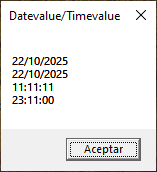
Watch how convert to a correct format even with unusual values or modificators but remember that the final value will be established in base on locale settings. Let’s pass to the next functions.
Timeserial / Dateserial
These functions are used to create a time or date value with the values that we pass as argument. It’s similar to preceding functions but on these we can apply mathematical operations. Let’s watch its syntax:
dateserial(year,month,day)
timeserial(hour,minutes,seconds)In the case of dateserial we must pass always first the year, month and finally day. Timeserial is more easy and if we don’t pass a value, it replaces with zero. Let’s analyze the following example:
dim final, date1, date2, time1, time2, s

date1 = date
s = split(date1, "/")
date2 = dateserial(s(2), s(1) + 7, s(0) + 17)
time1 = time
s = split(time1, ":")
time2 = timeserial(s(0), s(1), s(2))
final = formatdatetime(date2, vbLongDate) & vbCrLf
final = final & time2

msgbox final,,"Dateserial/Timeserial"First, we establish the actual date in date1. At this variable we apply the function split to separate each value and make it an array. Then we use to dateserial and we pass the values in preceding array and we sum a value to month and day. We repeat the preceding block but now with time and timeserial. Once we create the new hour we concatenate this variable with date2. But we use formatdatetime on date2 to change its format, this function was commented on this post. Finally, we show the values stored in final. Let’s watch its output:
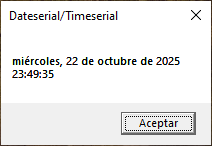
All these functions are additionals to function that we watched on preceding posts and some were mentioned.
In summary, today we have seen different functions to manage date and time, some return the actual date and time, and others are used to establish a new value of date or time. I hope you’ve found it useful. You can follow me on this social networks:


Donación
Es para mantenimento del sitio, gracias!
$1.50


 El blog de Tinchicus